







Heavy Crane Simulator
Advertisement
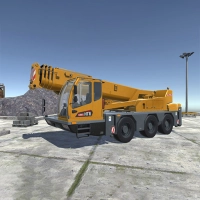 Welcome to the world of Heavy Crane Simulator, proudly brought to you by KEZY Games. Step into the operator's seat and take control of massive industrial machinery as you tackle a wide variety of challenging jobs across different locations. This is not just a simple driving game; it is a deep, hands-on simulation where precision, patience, and skill are your greatest tools. You will have the opportunity to drive powerful heavy trucks and work in perfect coordination with your crane to transport heavy containers and cargo. Every mission requires you to master both the road and the lift, combining driving and crane operation into one seamless experience.
The controls are designed for realism and full command. Use the WASD keys along with the Space bar to drive your vehicle forward, backward, and steer. Hold the Left Shift key to accelerate when you need extra power. Your mouse controls the camera view, allowing you to look around your environment by moving it, while the mouse wheel lets you zoom in and out for a closer look or a wider perspective. Press the Tab key to open the machine selection menu, where you can switch between different vehicles or equipment. To interact with menus and buttons, press G to activate the cursor. If you ever need a reminder of the controls, press I to bring up the full instruction screen.
When it comes to the crane itself, you have full control over every movement. Press Y to turn the crane on or off. Press K to toggle the hook on and off, or to connect a trailer to your truck. For rotating the crane arrow, hold the left mouse button and press A or D. To move the crane arrow forward or backward, hold the left mouse button and press Q or E. To raise or lower the crane arrow, hold the left mouse button and press W or S. You can also adjust the cabin height by holding the right mouse button and pressing W or S. To move the hook up or down, hold the Left Shift key and press W or S. For stabilizing the crane, hold either the left or right mouse button and press Z to adjust the side horizontal support, or press X for the side vertical support. Finally, press U to activate the support block for added stability during heavy lifts.
Master these controls and you will be ready to handle any job the simulation throws at you. Whether you are loading cargo at a busy dock, moving materials on a construction site, or transporting containers across rough terrain, Heavy Crane Simulator gives you the power and responsibility of real heavy machinery operation. KEZY Games invites you to take the challenge and prove your skills behind the wheel and at the controls.
Information
Game category: Simulation
Advertisement
 PLAY
PLAY
















Advertisement